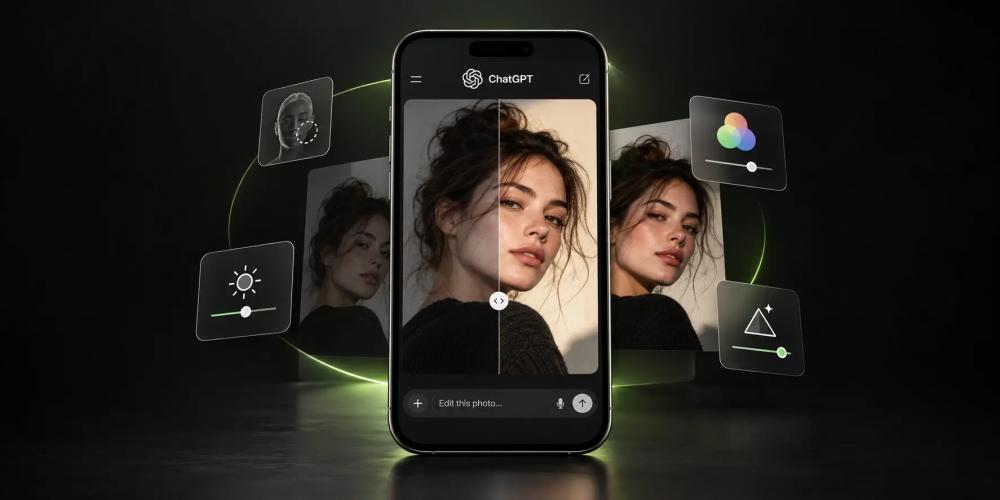
ChatGPT можно использовать не только для генерации изображений, ИИ-фотосессий и визуала для соцсетей. В него можно загрузить обычную фотографию со смартфона и попросить обработать её: поправить свет и цвет, убрать шум, сделать ретушь или придать снимку характер профессиональной съёмки.
Главное — точно описать в запросе, что можно менять, а что должно остаться как на исходной фотографии. Иначе вместе с обработкой нейросеть изменит лицо, кожу, фон или другие детали.
Ниже собрали готовые промпты для разных задач: от базовой ретуши и цветокоррекции до восстановления старых снимков, колорирования и киношной обработки.
Читайте также: Промты разных стилей для ИИ-фото
15 промтов для обработки фото в ChatGPT
В целом, эти промты можно использовать не только в ChatGPT, но и в других нейросетях для обработки фото.
1. Профессиональная обработка фотографии
Универсальная команда, если нужно улучшить фотографию без сильной стилизации. ChatGPT корректирует свет, баланс белого, контраст, цвета и резкость, но сохраняет исходный кадр.
Промт:
Edit this photo to a professional photographic standard while preserving the original image as faithfully as possible. Keep the person's exact identity, facial structure, age, skin tone, expression, hairstyle, body proportions, pose, clothing, camera angle, framing and background unchanged. Improve only the photographic quality: exposure, white balance, dynamic range, highlight and shadow detail, natural contrast, color balance, skin tones, sharpness and overall clarity. Apply subtle professional retouching where needed. Preserve real skin texture, pores, freckles, moles, scars, fine lines and other permanent features. Do not beautify or reshape the face or body. Do not add artificial skin texture, fake bokeh, HDR effects, excessive sharpening, heavy smoothing or AI-looking details. The final image should look like the same photograph professionally edited by an experienced photographer, not regenerated by AI.
2. Естественная ретушь портрета
Подойдёт для портретов и крупных планов. Промт просит убрать дефекты кожи и блеск, но сохранить поры, родинки, веснушки и естественную текстуру.
Промт:
Retouch this portrait to a natural high-end professional standard. Preserve the person's exact facial identity, face shape, bone structure, eyes, nose, lips, jawline, age, skin tone, expression and hairstyle. Remove only temporary imperfections such as small blemishes, minor redness, stray hairs and excessive skin shine. Gently reduce uneven skin tone and under-eye darkness where appropriate. Preserve natural pores, fine lines, freckles, moles, scars and real skin texture. Keep the eyes realistic and enhance their clarity only slightly. Do not reshape facial features, enlarge the eyes, whiten the teeth excessively, change the jawline, smooth the skin into plastic texture or apply a beauty-filter look. Keep the original lighting, pose, framing and background. The finished portrait should look professionally retouched but still completely natural.
3. Исправление света и экспозиции
Для слишком тёмных, светлых или неравномерно освещённых кадров. Нейросеть должна сохранить направление исходного света и скорректировать экспозицию.
Промт:
Professionally correct the lighting and exposure in this photograph. Preserve the subject, identity, composition, camera angle, background and original direction of light. Correct underexposed or overexposed areas, recover usable highlight and shadow detail, balance brightness across the image and improve tonal separation. Keep the lighting physically believable. Preserve natural shadow direction, skin tones and the original atmosphere of the scene. Do not add new light sources, rim lights, lens flares or artificial glow. Do not change the face, body, clothing or background. The result should look like the original photograph was exposed and processed correctly by a professional photographer.
4. Естественная цветокоррекция
Помогает исправить баланс белого, слишком холодный или тёплый оттенок фотографии и чрезмерную насыщенность.
Промт:
Professionally color-correct this photograph while keeping its original visual character. Preserve the subject, identity, composition, lighting direction and scene exactly as they are. Correct the white balance and unwanted color casts. Make whites neutral where appropriate, keep skin tones accurate and natural, improve color separation, and balance saturation across the image. Refine contrast and tonal response gently, with smooth highlight roll-off and detailed shadows. Do not introduce orange skin, excessive teal-and-orange grading, neon saturation, crushed blacks, blown highlights or artificial HDR. The final result should look naturally color-corrected by a professional photographer.
5. Журнальная цветокоррекция
Более выразительный вариант обработки с контрастом, разделением цветов и мягкими светлыми участками.
Промт:
Apply a refined editorial color grade to this photograph. Use the uploaded image strictly as the base photograph. Preserve identity, facial features, skin texture, expression, pose, framing, perspective, background, objects and lighting direction. Create smooth tonal transitions, restrained contrast, natural skin tones, controlled reds, neutral whites, detailed shadows and a soft highlight roll-off. Add subtle color separation and gentle micro-contrast without digital oversharpening. Keep saturation sophisticated and restrained. Use extremely subtle fine photographic grain only if it improves the image. No artificial relighting, fake depth of field, excessive bloom, HDR glow, orange skin, crushed blacks or stylized color effects. The result should feel like a premium editorial photograph with careful professional color grading rather than an AI filter.
6. Улучшение качества фотографии
Для снимков с компрессией, небольшим количеством деталей или общей мягкостью изображения.
Промт:
Enhance the technical quality of this photograph conservatively. Preserve the exact identity, facial features, expression, pose, composition, colors, lighting, background and all existing objects. Reduce visible compression artifacts, digital noise and mild softness. Improve edge definition and recover only detail that is reasonably supported by the original image. Preserve natural skin texture, hair structure, fabric texture and photographic grain. Do not invent facial details, eyelashes, teeth, hair strands, text, patterns or background objects that cannot be determined from the source image. Do not change the composition or reinterpret the photograph. The goal is a cleaner and clearer version of the same photo, not a newly generated reconstruction.
7. Убрать шум и размытие
Этот запрос для фото при плохом освещении, с цифровым шумом или смазанностью.
Промт:
Improve the clarity of this slightly blurry and noisy photograph while preserving the original image faithfully. Reduce digital noise, compression artifacts and mild motion softness. Recover natural edge definition where the source image contains enough information. Preserve the person's exact facial identity, expression, skin texture, hair, clothing, pose and proportions. Do not reconstruct or invent facial features. Do not create artificial pores, eyelashes, hair strands, text or textures. Avoid aggressive sharpening, halos, crunchy micro-contrast and waxy noise reduction. Keep the original colors, composition, lighting and depth of field. Produce a cleaner, clearer photograph while remaining visually faithful to the source.
8. Восстановление старой фотографии
Команда для старых бумажных фотографий со следами времени: царапинами, пятнами, заломами и выцветшими участками.
Промт:
Restore this old photograph conservatively. Repair visible scratches, dust, stains, folds, creases, fading, discoloration and minor physical damage. Preserve every person's identity, facial structure, age, expression, hairstyle, clothing, jewelry, pose and proportions as faithfully as possible. Preserve the original composition, background, lighting and historical character of the photograph. Improve contrast and clarity gently while retaining natural photographic texture and appropriate grain. Do not beautify the people, make them younger, modernize their appearance, replace clothing, change the setting or invent unsupported facial details. Where information has been permanently lost, do not create unnecessary detail merely to make the image sharper. The result should look like a carefully restored version of the original photograph, not a modern re-creation.
9. Колорирование чёрно-белой фотографии
Добавляет естественные цвета, сохраняя исходный свет, контраст и фактуру снимка.
Промт:
Colorize this black-and-white photograph conservatively and realistically. Preserve the exact faces, expressions, age, hairstyles, clothing, pose, composition, lighting, contrast and original photographic texture. Add natural, historically plausible colors with restrained saturation. Keep skin tones realistic and avoid modern color-grading aesthetics. Respect the existing grayscale luminosity: dark areas should remain tonally dark and highlights should remain naturally bright. Do not alter facial features, redraw clothing, modernize the scene or introduce new objects. Do not claim to recover the original historical colors. Where the true color cannot be known, use plausible neutral tones rather than vivid guesses. The final image should look like a carefully hand-colorized historical photograph.
10. Очистить фон
Подходит, если за человеком находятся мелкие предметы, мусор, яркие детали или другой визуальный шум, который отвлекает от главного объекта.
Промт:
Clean up the background of this photograph while leaving the main subject completely unchanged. Identify minor distracting elements such as small clutter, temporary objects, visual debris or bright distractions and reduce or remove only those elements. Preserve the person's exact face, hair, body, clothing, pose and edges. Maintain the original background architecture, perspective, lighting, shadows and depth of field. Do not replace the entire background and do not introduce artificial blur. The result should look like a subtly cleaned-up version of the original photograph.
11. Современная киношная обработка
Добавляет цветокоррекцию художественного фильма: более мягкий свет, тени и разделение тёплых и холодных оттенков.
Промт:
Apply a refined cinematic color grade to this photograph while preserving the original image and subject faithfully. Keep the person's exact identity, facial features, skin texture, expression, hairstyle, body proportions, pose, clothing, framing, background and existing lighting direction unchanged. Create a natural cinematic tonal response with controlled contrast, slightly softened highlights, detailed shadows, subtle color separation and realistic skin tones. Use restrained warm highlights and slightly cooler shadows where appropriate, without forcing a teal-and-orange look. Add very subtle film-like grain and gentle highlight halation only if it fits the existing lighting. Do not relight the scene, replace the background, reshape the subject or add artificial depth of field. Avoid HDR, crushed blacks, excessive saturation, heavy bloom and obvious AI effects. The result should look like a professionally color-graded frame from a contemporary feature film.
12. Фотография на плёнку 1970-х
Тёплая цветная плёнка с мягким контрастом, приглушёнными цветами и небольшим зерном.
Промт:
Process this photograph with the restrained character of a professionally scanned 1970s color film photograph. Preserve the exact subject, identity, facial features, expression, pose, clothing, composition, background and original lighting. Use warm but natural skin tones, slightly muted colors, soft contrast, gentle highlight roll-off, lifted but detailed shadows and subtle warm color shifts typical of aged color negative film. Add fine organic film grain and very subtle color variation across the image. Keep the photograph sharp enough to preserve real detail, but avoid modern digital crispness. Do not add scratches, fake dust, light leaks, borders or exaggerated vintage effects. Do not alter the subject or scene. The final image should feel like an authentic well-preserved film photograph from the 1970s, professionally scanned and color corrected.
14. Фотография 1990-х
Более светлая ретрообработка с зелёными и голубыми оттенками, спокойными цветами и плёночным зерном.
Промт:
Give this photograph a subtle 1990s Japanese color-negative film look. Preserve the person's exact identity, face, skin texture, expression, body proportions, pose, clothing, composition, background and lighting. Use clean natural skin tones, slightly cool neutral shadows, soft pastel greens and blues, restrained reds, moderate saturation and smooth tonal transitions. Keep highlights soft and slightly creamy while maintaining detail. Preserve open shadows without making the image flat. Add fine natural film grain and a very subtle analog softness. Avoid strong cinematic grading, orange skin, heavy fading, fake light leaks, excessive grain or artificial blur. The result should resemble a carefully exposed and professionally scanned Japanese consumer or portrait film photograph from the 1990s.
15. Фотография для журнала
Более контрастная обработка в духе модных съёмок 1990-х: прямой свет, плотный чёрный цвет и естественная фактура плёнки.
Промт:
Process this photograph with the character of a high-end 1990s editorial fashion photograph shot on color film with direct flash. Preserve the subject's exact identity, facial structure, skin texture, expression, hairstyle, body proportions, clothing and pose. Keep the existing composition and environment. Create crisp but natural subject definition, direct-flash-style tonal contrast, clean skin tones, slightly dense blacks, restrained saturation and subtle analog grain. Highlights may be bright and direct, but should retain realistic texture. Keep shadows simple and photographic rather than dramatically relit. Do not beautify the face, change body proportions or turn the image into a modern glossy beauty campaign. Avoid plastic skin, excessive sharpening, artificial glow and heavy vintage effects. The result should feel like an authentic 1990s magazine editorial photograph scanned from high-quality film.
15. Документальная фотография
Подходит для улицы, путешествий и повседневных кадров. Сохраняет естественный свет и обстановку, добавляя плёночную фактуру.
Промт:
Process this photograph with a restrained documentary film aesthetic. Preserve every person, facial feature, expression, gesture, object, background element, composition and lighting exactly as photographed. Use natural color, moderate contrast, detailed shadows, slightly subdued saturation and realistic skin tones. Introduce subtle film grain and gentle tonal irregularity while preserving authentic texture and available-light character. Do not beautify people, clean up the environment unnecessarily, add cinematic lighting or make the scene look staged. Avoid excessive sharpness, HDR, strong color grading, artificial bokeh and decorative vintage effects. The final result should feel like an observational documentary photograph captured naturally on 35mm film.
Как использовать промпты для обработки фото в ChatGPT?
Добавьте исходную фотографию в ChatGPT и вставьте нужны промпт. Его можно использовать как есть или изменить отдельные формулировки под конкретную задачу.

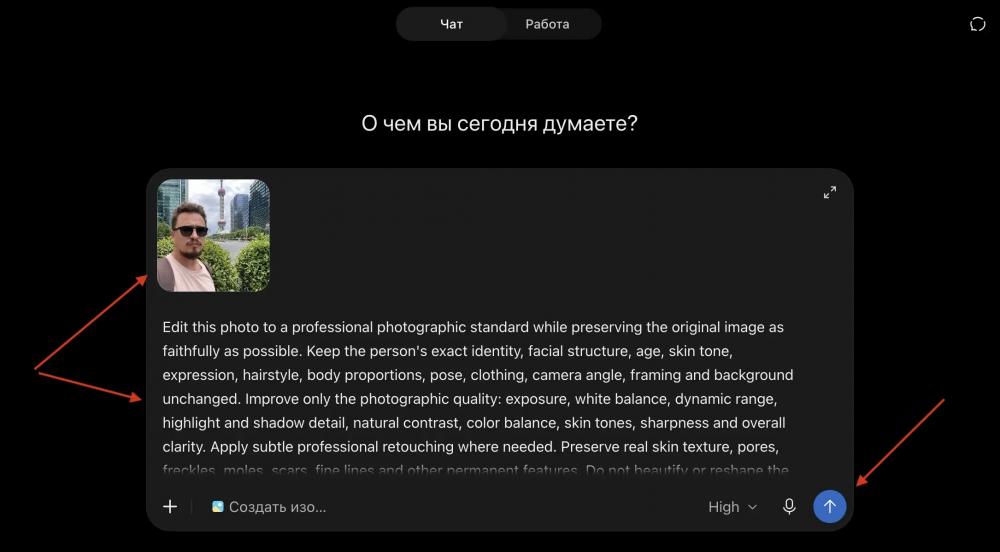
После этого отправьте запрос и дождитесь обработанной версии фотографии.
Если результат устраивает, но нужно поправить одну деталь, не запускайте всю обработку заново. Напишите отдельную команду, например: Keep everything else unchanged. Reduce the skin smoothing and preserve more natural skin texture.
Так вы контролируете изменения и не даёте ChatGPT заново переделывать весь снимок.